How to Use Official WhatsApp and GB WhatsApp on Same Phone?
Learn how to use official WhatsApp and GB WhatsApp on the same phone safely in 2025. Step-by-step guide to run dual WhatsApp accounts easily.
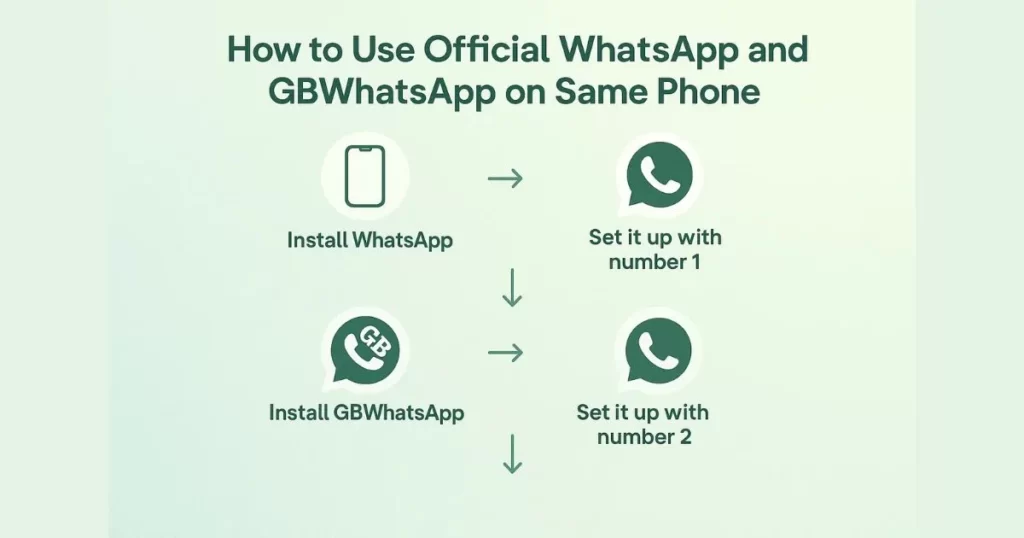
Have you ever wished you could run both the official WhatsApp and GB WhatsApp on the same phone? You’re not alone. Many people want to separate their personal and professional chats or enjoy GB WhatsApp’s extra features without giving up the stability of the official app. The good news is—you can use both versions side by side, and it’s much easier than you might think. In this guide, we’ll show you exactly how to do it safely and step by step.
Before we begin, it’s important to understand why this works. GB WhatsApp is a modified version of WhatsApp with advanced customization and privacy options. Since it uses a different package name, it doesn’t conflict with the official WhatsApp app installed on your device. That means you can install both apps, register different numbers, and switch between them seamlessly. However, there are a few precautions you should take to avoid data loss or account issues—and we’ll walk you through them all.
As a team that has tested multiple WhatsApp mods and dual-app setups over the years, we know how tricky it can feel at first. That’s why this guide focuses on keeping things simple and beginner-friendly. Whether you’re using Android’s native dual-app feature or a third-party solution, by the end of this tutorial you’ll have both WhatsApp accounts running smoothly on one phone.
Why Use Dual WhatsApp?
Many users prefer to keep personal and professional chats separate. With dual WhatsApp, you can:
- Use two different phone numbers.
- Manage multiple conversations without switching devices.
- Avoid mixing up personal and work-related messages.
Steps to Use Official WhatsApp and GB WhatsApp on Same Phone
Follow these steps to easily manage two WhatsApp accounts on one device.
Download GB WhatsApp
If you’re already using one account on the official WhatsApp, you can add a second number by using GB WhatsApp. Simply download the GB WhatsApp APK from our website and set it up with your alternate number.
Register a Second Number
After launching GB WhatsApp, enter your second phone number when prompted. Make sure it’s different from your primary WhatsApp number. Verify it by entering the SMS code sent to your device to complete the registration.
Set up Your Account
Enter your name, set a profile photo, and restore any backup if available. You’re now ready to use GB WhatsApp with a second number.
Use Both Account Simultaneously
You can now use both the official WhatsApp and GB WhatsApp apps side by side. Switch between them easily to manage your conversations.
Also See
- How to Change Voice in GB WhatsApp to send funny voice notes?
- How to Change Themes in GB WhatsApp?
- How to Solve GB WhatsApp Not Sending/Receiving Messages?
Tips to Manage Dual WhatsApp Accounts
- Use different profile photos or names to easily identify each account.
- Set custom notification tones for each app to avoid confusion.
- Enable chat backup individually for both accounts.
- Keep both apps updated to enjoy the latest features and stability.
Conclusion
Using both the official WhatsApp and GB WhatsApp on the same phone is no longer a complicated task. With the right steps and a little caution, you can easily enjoy the best of both worlds—keep your personal chats on the official app and explore GB WhatsApp’s advanced features like themes and privacy controls without any conflict. Whether you’re using Android’s built-in dual-app feature or a third-party cloning tool, setting them up takes just a few minutes.
That said, it’s crucial to download GB WhatsApp from a trusted source and avoid using the same phone number on both apps to prevent any potential issues. We always recommend backing up your chats before making changes, so you don’t risk losing important conversations. With years of experience in testing WhatsApp mods and helping users set up dual apps, we’ve seen how a little preparation can save you a lot of trouble later.
If you still have questions or run into any issues while setting this up, don’t hesitate to drop your query in the comments section below. Our team reads every comment and is happy to help. You can also reach out directly to our support team for faster assistance. And if you found this guide helpful, why not share it with your friends or family? They might appreciate knowing how to manage two WhatsApp accounts too.
While you’re here, check out our other blogs on GB WhatsApp tips —you might discover something new that takes your experience to the next level!
FAQs
Do I need two phone numbers for dual WhatsApp?
Yes, each WhatsApp account must be linked to a unique phone number.
Is GB WhatsApp free to use?
Yes, GB WhatsApp is completely free and doesn’t require any subscription fees.
Can I use the same phone number for WhatsApp and GB WhatsApp?
No, you cannot use the same phone number for both apps at the same time. Each app requires a unique phone number to work properly. If you try to register the same number on both, it will log you out of one. To avoid issues, use two different numbers—such as your primary SIM and a secondary one.
What are the risks of using GB WhatsApp?
GB WhatsApp offers great customization, but it’s not official and may expose you to risks like data privacy issues, malware, or even account bans. Always download it from trusted websites and avoid sharing sensitive information through the app.